Get started with CoSparks
The three kinds of spaces, how to make one, and how to find your way back to it.
CoSparks is where a team thinks together, live. Everything happens in a space, and each space has a link you share.
Three kinds of spaces
- A collab board is an open canvas: stickies, frames, shapes, pictures, links, drawing, dot voting and comments. Use it to brainstorm, map or plan.
- A retrospective has cards in columns, votes and action items, and moves through three steps. See Run a retro.
- A goal space holds goals and their key results as one tree. See Keep goals in a goal space.
All three work the same way for sharing, people limits and plans.
Make a space
You need to be signed in with your Persera account. On Home, choose one of the three tiles at the top, then:
- Give it a name.
- Under Who can open it, choose Only people I add or Anyone with the link. You can change this later.
- Choose Create.
If you're in a team, Where also asks whether the space belongs to it.
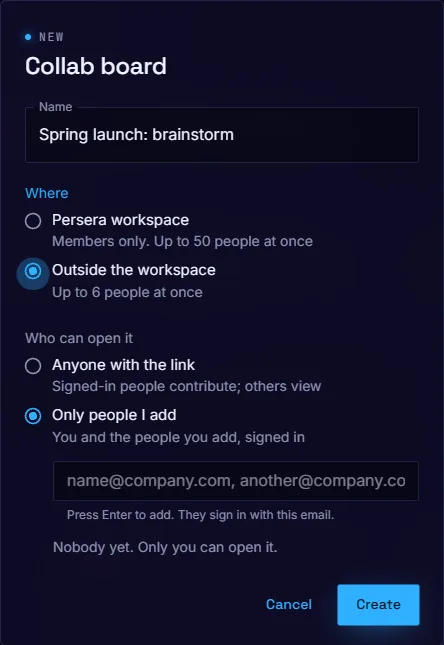
The space opens right away. To bring others in, share its link.
Find your spaces again
Home lists your spaces under four tabs:
- Mine: the spaces you created.
- Shared with me: other people's spaces you've opened.
- My actions: action items assigned to you, from every space you can open.
- Archived: spaces put away. Open one to restore it.
Search in the top bar (Ctrl K, or ⌘ K on a Mac) jumps to a space by its name.
Sessions
Spaces whose names start the same way, up to a colon, belong together: "Spring launch: brainstorm" and "Spring launch: retro" show on Home as one session. Open wrap-up on the session gives one page with what it decided: top ideas, most voted cards, goals and action items.
Working with others
Changes show for everyone at once; nobody needs to refresh. People who aren't signed in can watch a space that's open to anyone with the link, and sign in to take part.
To let in someone without an account, such as a client, invite them as a guest.
Help while you work
The question mark in the top bar (or the ? key) opens help beside what you're doing, with the articles for where you are listed first.
Related
Share a space and choose who can open itCopy the link, limit a space to the people you list, add co-facilitators, or reset the link.Run a retroSet up the columns, take the team through contributing, voting and discussing, and leave with action items.Keep goals in a goal spaceWrite goals with measurable key results, put them under the bigger goals they support, and keep progress up to date.Updated Nov 10, 2026
Still stuck? Email cosparks-help@persera.ca.