Answer a sign-off request
Approve or ask for changes, and what "Changed since approved" means.
Someone asked you to approve a board, a frame on it, or a goal.
Find the request
On a board, open Sign-off: the number beside it counts the requests waiting on you. On a goal, the section is under its key results. The request names what you're asked to approve and may carry a note.
Answer
Choose Approve or Ask for changes, with a comment if you like. The people who run the space see your answer and comment right away.
You can change your mind later with Change my answer.
Guests: your passcode again
If you're in on a guest pass, answering asks for your passcode once more. It shows the answer is yours, not someone else's at your screen. Wrong passcodes count toward the pass's lock, see If the passcode doesn't work.
Changed since approved
Your approval is for the content as it was when you gave it. If its words, colours, shapes, pictures or a goal's targets change afterwards, your answer shows Changed since approved and the request waits on you again.
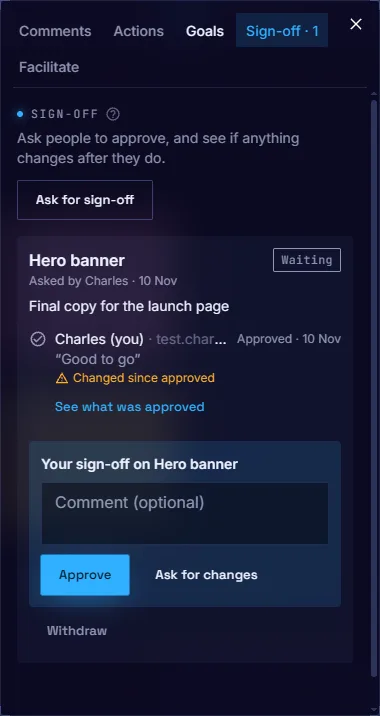
Open See what was approved under your answer to compare with what you approved, then answer again. Things being moved around, or a goal's progress being updated, don't count as a change.
Related
Ask for sign-offAsk named people to approve a board, a frame or a goal, and see if it changes afterwards.You were invited as a guestOpen a space with your link and passcode, and what you can do there.Updated Nov 10, 2026
Still stuck? Email cosparks-help@persera.ca.