Bold, italic and links in a sticky
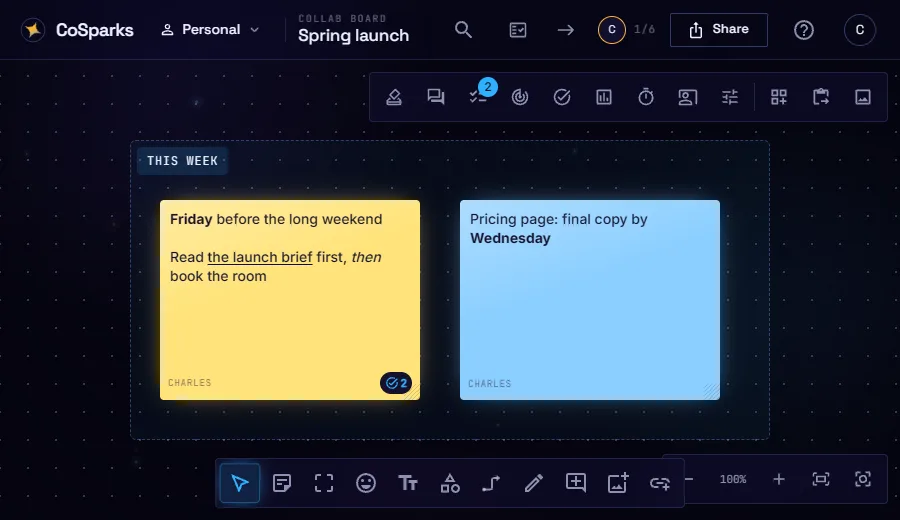
Make words in a sticky or a shape bold or italic, and turn words into a link.
The words in a sticky or a shape can be bold or italic, and can link to a web page.
With the keyboard
Double-click a sticky to write in it, select some words, and press:
- Ctrl+B for bold
- Ctrl+I for italic
- Ctrl+K for a link: type or paste the address where
https://is
On a Mac, use ⌘ where this says Ctrl. The same key takes bold or italic off again.
Pasting a web address over selected words makes those words a link to it.
By typing it
While you write, the formatting shows as marks around the words. You can type them yourself:
**bold***italic*[the words](https://persera.ca/page)for a link with its own words
A web address typed or pasted by itself becomes a link too.
Links
A click on a link opens it in a new tab. Hold the pointer over a link to see where it goes: the words of a link can say anything, the address can't.
Only web addresses work: http and https. For a link that stands by itself on the board, with a title, add it as a card.
What isn't there
- No headings, lists or underline. For a heading, use the Text tool beside the stickies.
- Underscores and single stars with spaces around them stay as typed, so
snake_caseand2 * 3are safe. - A board saved as a picture shows the words without bold, italic or links. The text export keeps the marks, which other tools read as Markdown.
Related
Put a link on a boardAdd a web address as a card that opens in a new tab.Action items on a boardWrite down who does what next, tie an action item to the card it came from, and find your own on Home.Save a board as a picture or a PDFA PNG of a selection, a frame or the whole board, or a PDF with one frame per page.Updated Nov 19, 2026
Still stuck? Email cosparks-help@persera.ca.